
There is a price where a gaming keyboard stops feeling like a compromise and starts feeling like a smart buy. For me, in 2026, that price is under $60 — and the best budget gaming keyboard is not the cheapest board you can find, it is the cheapest board that still gets the important things right.
That is why this guide is built around finding the best budget gaming keyboard, not a cheap keyboard. Every pick below is a true mechanical board — or, in one case, a Hall-effect magnetic board — from a known gaming brand, rated 4.3 stars or higher, and priced under $50 at the time I checked it. No membrane fillers, no no-name gambles, no boards that only look good in a thumbnail.
Disclosure: As an Amazon Associate, EWM PLAY earns from qualifying purchases. It does not cost you anything extra, and it helps keep the lights on and the reviews coming. Prices and ratings below were checked at publish time and can move, so check the card under each pick for the live deal.
The Best Budget Gaming Keyboards of 2026: Quick Picks
Cheapest way in: Redragon K552 — $36.99, 4.4 stars from 34,632 reviews. A wired mechanical board with red switches and the most buyer proof in this guide.
Best hot-swap starter: Redragon K668 — $39.99, 4.5 stars from 1,611 reviews. Full-size, hot-swappable, with extra hotkeys for macros and media.
Best compact Hall-effect bargain: AULA WIN68 HE — $39.99, 4.6 stars from 739 reviews. A 60% board with fast-trigger magnetic switches for competitive play.
Best classic full-size alternative: AULA F2088 — $41.99, 4.4 stars from 2,761 reviews. A wired 104-key mechanical board with a straightforward, no-nonsense layout.
Best wireless budget board: Redragon K673 PRO — $49.99, 4.6 stars from 1,458 reviews. A compact wireless gasket board with a knob and a much better sound than its price suggests.


The Best Budget Gaming Keyboards, Pick by Pick
I am ordering these by price and by job, not by hype. The cheapest board here is not the best board here — it is the best board if you want a real mechanical feel for the least money and do not care about a numpad, wireless, or swappable switches. Read the weakness line on each pick first. That is where budget boards actually differ.
1. Redragon K552 — the $36.99 tenkeyless starter
Who it is for: anyone who wants a real mechanical keyboard for the least money and does not need a numpad. If you play on a smaller desk and your hands live on WASD anyway, start here. At $36.99 with a 4.4-star rating from 34,632 reviews, it is also the pick with the most buyer proof in this guide by a wide margin.
What you get: a wired mechanical board with smooth linear red switches, rainbow LED backlighting, and software for customization, all without fuss. Keypresses feel consistent, there is nothing to charge, pair, or troubleshoot, and for competitive play at this price, wired is a feature, not a drawback.
What you give up vs premium: the numpad, first of all, plus the frame and keycap refinement of a $100 board, and you do not get hot-swap sockets or wireless. If you already know you want to swap switches later, or you cannot live without a numpad, skip to the K668 below instead of buying this one twice.

- 🔥𝗧𝗿𝘂𝗲 𝗠𝗲𝗰𝗵𝗮𝗻𝗶𝗰𝗮𝗹 𝗙𝗲𝗲𝗹 𝘄𝗶𝘁𝗵 𝗟𝗶𝗻𝗲𝗮𝗿 𝗥𝗲𝗱 𝗦𝘄𝗶𝘁𝗰𝗵𝗲𝘀 – Experience smooth, consistent keystrokes with linear red mechanical swi…
- 🔥𝗩𝗶𝗯𝗿𝗮𝗻𝘁 𝗥𝗮𝗶𝗻𝗯𝗼𝘄 𝗟𝗘𝗗 𝗕𝗮𝗰𝗸𝗹𝗶𝗴𝗵𝘁𝗶𝗻𝗴 𝘄𝗶𝘁𝗵 𝟲 𝗗𝘆𝗻𝗮𝗺𝗶𝗰 𝗠𝗼𝗱𝗲𝘀 – Enjoy eye-catching rainbow backlighting with 6 preset lighting …
- 🔥𝗦𝗼𝗳𝘁𝘄𝗮𝗿𝗲 𝗗𝗿𝗶𝘃𝗲𝗿 𝗦𝘂𝗽𝗽𝗼𝗿𝘁 𝗳𝗼𝗿 𝗙𝘂𝗹𝗹 𝗖𝘂𝘀𝘁𝗼𝗺𝗶𝘇𝗮𝘁𝗶𝗼𝗻 𝗖𝗼𝗻𝘁𝗿𝗼𝗹 – Take control of your K552-KR with dedicated software drivers, …
2. Redragon K668 — the $39.99 hot-swap full-size pick
Who it is for: anyone who wants a full-size board they can grow with. If you like the K552’s feel but you already know you will want to try different switches, this is the smarter buy, because you can pull the stock switches out and drop new ones in without soldering.
What you get: a hot-swappable 108-key wired board with RGB, extra hotkeys for macros and media, and the same familiar full-size layout. At $39.99 with a 4.5-star rating from 1,611 reviews, it is the pick for tinkerers who do not want to pay a premium for the privilege of tinkering.
What you give up vs premium: it is still a budget build, so the case and caps will not match a $100 board, and there is no wireless here. You are paying for sockets and layout, not for a premium typing sound — but sockets are the upgrade that actually saves you money later.

- 4 Extra Hotkeys, Full-Size 108-Key Anti-Ghosting – Dedicated shortcut keys default to mute, calculator, screen lock and …
- Swap Switches Without Soldering, Smooth and Quiet – The upgraded socket accepts almost any 3-pin or 5-pin switch, and st…
- Vibrant RGB for a True eSports Vibe – Up to 19 preset lighting modes with adjustable brightness and flow speed, includin…
3. AULA WIN68 HE — the $39.99 compact Hall-effect bargain
Who it is for: competitive players who want a small, fast board and do not mind learning a 60% layout. If your game is about reaction time and you have never tried fast-trigger keys, this is the cheapest honest way to find out whether they suit you.
What you get: a 60% board with Hall-effect magnetic switches, fast-trigger mode, and 8000Hz polling, plus RGB — at $39.99 with a 4.6-star rating from 739 reviews. That is tech that used to cost twice this price, and in fast shooters you can genuinely feel the difference in how quickly a key re-registers.
What you give up vs premium: the layout, not the speed. There is no numpad, no function row, and no arrow cluster, so everything else lives on layers you have to learn. And this is not a traditional mechanical board you can swap normal switches into — you are buying it for the magnetic switches it already has, so be sure you like that feel before you commit.

- Fast Trigger Gaming Keyboard: AULA WIN68 HE magnetic gaming keyboard offers an industry-leading 8,000Hz polling rate and…
- Hall Effect Keyboard with Magnetic Switch: Equipped with advanced hall effect magnetic switches, the WIN68 HE black gami…
- Customizable Web Driver: The mechanical gaming keyboard is equipped with a professional web driver that allows users to …
4. AULA F2088 — the $41.99 classic full-size alternative
Who it is for: anyone who wants a straightforward full-size mechanical board from a second brand, not just another Redragon. If you type a lot as well as game, and you like a classic 104-key layout with a typewriter-style look, this one deserves a look.
What you get: a wired 104-key mechanical gaming board at $41.99 with a 4.4-star rating from 2,761 reviews. It is the least flashy pick here, and that is the point — a normal layout, normal keys, and a price that leaves money for a better mouse or headset.
What you give up vs premium: refinement. You do not get wireless, a gasket mount, or a premium sound profile, and the styling will not win any desk-setup awards. Buy it for the layout and the price, not for the flex.
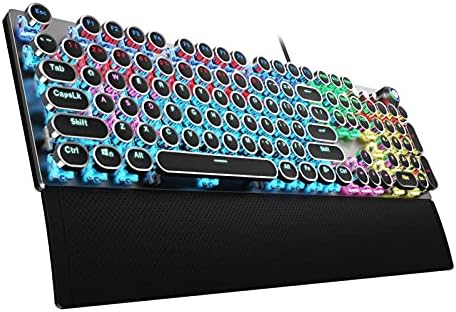
- Retro Typewriter Style Round Keycaps: Mechanical blue switch offers a quicker and springier response, crisp click sound,…
- Multimedia and Backlight Control Knob: This wired mechanical keyboard effortlessly controls media thanks to its dedicate…
- Metal Panel and Magnetic Wrist Rest: The computer keyboard panel is made of top-grade aluminium alloy material, with mat…
5. Redragon K673 PRO — the $49.99 wireless gasket pick
Who it is for: anyone who wants to cut the cable without jumping to a $100 wireless board. If your desk is tight, your PC sits far away, or you just hate cable drag in shooters, this is the budget way to go wireless without giving up a real mechanical feel.
What you get: a compact 81-key wireless gasket board with RGB and a scroll knob at $49.99, with a 4.6-star rating from 1,458 reviews. The gasket mount is the headline here — it softens the typing feel and sound in a way budget boards usually do not, and the knob makes volume changes instant.
What you give up vs premium: size and battery headroom. You lose the numpad, and wireless at this price means keeping an eye on charge and on the connection mode you are using. It is still the best-sounding board in this guide for the money, but it is not a full-size replacement — pick it because you want compact and wireless, not because it does everything.

- One-Knob Simplicity – A single control knob adjusts backlight brightness and media playback, so you manage lighting and …
- Switch Devices Without Re-Pairing, Zero Lag – Tri-mode connectivity jumps between USB-C, Bluetooth, and 2.4GHz wireless,…
- Creamy Cushioned Typing Feel, Swap-Ready Anytime – Gasket-mounted construction with 5-layer noise dampening gives a soft…
Comparison: What the Money Actually Buys
The spread here is only $13, from $36.99 to $49.99, but that $13 buys very different things. The K552 gives you the core experience: real mechanical switches and a price that leaves room for a better mouse. The K668 and the K673 PRO spend the extra money on upgrade paths — hot-swap sockets on one, wireless and a gasket mount on the other. The WIN68 HE spends it on speed, and the F2088 spends it on a bigger, more traditional layout.
If you only play one or two games and you just want something that feels right, stop at the K552 and pocket the difference. If you are the kind of player who will still be using this board in two years, the K668 is the smarter $39.99 spend, because a $15 set of switches later turns it into a different-feeling board without buying a whole new keyboard. And if cable drag genuinely annoys you, do not talk yourself into a wired board to save $10 — the K673 PRO at $49.99 is still cheap, and a board you enjoy using beats a board you resent every session.
The false economy in this price range is not buying a $37 board. It is buying a $25 membrane board that feels mushy in month one, then replacing it with a $50 mechanical board six months later. Every pick in this guide is built to avoid that second purchase, which is the whole point of a budget gaming keyboard done right.
Budget Buying Guide: Where the Money Goes
Switches at low prices: do not overthink the color name. At this price, linear red-style switches are the safe default for gaming — smooth, light, and easy to spam in shooters — while clicky blue-style switches sound great and will annoy everyone in your voice chat. If you want a board that can change its feel later, buy hot-swap sockets now, like the K668 offers, because that one feature is cheaper than a second keyboard later. Hall-effect switches, like the WIN68 HE uses, are a different animal: magnetic, fast-triggering, and genuinely useful for competitive play, but you cannot just drop normal mechanical switches into them.
Keycaps: this is where budget boards quietly cut costs. Thin ABS caps will shine up and feel slick after months of use, and legends can wear. That is normal at $40, not a defect, and it is fixable later with a cheap cap set — another reason hot-swap and a standard layout matter more than fancy caps on day one. The F2088 is the exception worth noting here, with a metal panel that makes the whole board feel more solid than its price suggests.
Build quality: ignore the marketing words and check the frame. A board that flexes when you pick it up by a corner will not get better with age, while a simple, stiff, wired board will outlast a flashier wireless one that you keep forgetting to charge. Gasket mounts, like the K673 PRO has, help sound and feel, but they are a bonus at this price, not a requirement. What you should not accept, at any price in this guide, is a membrane board dressed up as a gaming keyboard — that is the one compromise that actually costs you games.
When to spend more: spend more when you have a specific problem this guide cannot solve. If you need a numpad and wireless and hot-swap all at once, you are out of the under-$50 range and into the $70 to $100 boards. If you play ranked shooters daily and you already know you love fast-trigger keys, a premium Hall-effect board is a real upgrade, not just a nicer box. But if you are buying your first mechanical board, or replacing a tired membrane one, do not spend $100 to find out what you like — spend $37 to $50, learn your layout and switch preference, and let your second board be the expensive one.
Frequently Asked Questions
Is a budget gaming keyboard actually good enough for competitive play? Yes, if you pick a real mechanical or Hall-effect board like the ones in this guide. The K552 and K668 are wired, responsive, and consistent, and the WIN68 HE adds fast-trigger keys at $39.99. What you lose at this price is refinement, not reaction time.
Should I get a hot-swappable budget keyboard? If you think you will ever want to change how your board feels, yes. The K668 at $39.99 lets you swap switches without soldering, so a cheap switch set later can completely change the typing feel. If you know you will never open the board up, save the money and get the K552.
Is wireless worth it on a budget gaming keyboard? Only if the cable genuinely bothers you. The K673 PRO at $49.99 is a solid wireless pick with a gasket mount and a knob, but wireless means charging and connection modes to manage. For pure competitive play, a wired board at the same price is simpler and has nothing to run out of mid-match.
What is the best budget gaming keyboard overall? For most players, the Redragon K668 at $39.99 is the sweet spot: full-size, hot-swappable, and cheap enough to leave money for the rest of your setup. If you want the cheapest real mechanical board, get the K552 at $36.99. If you want wireless, get the K673 PRO at $49.99.
The Verdict: Budget Done Right
Budget done right does not mean buying the cheapest keyboard on the page. It means buying the cheapest keyboard that still gives you real switches, a layout you can live with, and a reason to keep it for years. That is the whole list in this guide, from the $36.99 K552 to the $49.99 K673 PRO, and every one of them beats a membrane board that costs less and feels worse from day one.
My pick for the best budget gaming keyboard, if you make me choose one, is the Redragon K668 at $39.99. Full-size, hot-swappable, and cheap enough that you can still afford a proper mouse to go with it. If you want wireless, step up to the K673 PRO. If you want raw speed, try the WIN68 HE. But do not overthink it — pick the layout first, the switch style second, and let the price take care of itself.
Keep exploring: browse the Shop for the full gear range, check the Keyboards category for every board we cover, compare with the Best Gaming Keyboards 2026 guide, the Best Mechanical Keyboards 2026 guide, and the Best 75% Keyboards 2026 guide, then round out your setup with the Best Gaming Headsets 2026 guide and Best Xbox Controllers 2026.