
Disclosure: This post contains affiliate links. As an Amazon Associate, EWM PLAY earns from qualifying purchases made through links on this page, at no extra cost to you. Prices and ratings below were checked at the time of writing and can change.
If you have ever typed on a mushy membrane board and then switched to a proper mechanical keyboard, you know the difference in about ten seconds. It is not just louder or flashier. The keypress feels deliberate, the travel feels consistent, and your fingers stop guessing. That is why the best mechanical keyboard is still the upgrade I recommend first to almost any PC gamer — before a new mouse, before more RGB, before almost anything else on the desk.
This is not a re-run of our general keyboard guide. That guide answers a broad question: what gaming keyboard should you buy? This one goes deeper on the thing that actually defines a mechanical board — the switch underneath the keycap. Linear, tactile, clicky, Hall effect, hot-swappable: those choices change how a board feels in a ranked match at midnight and how it feels during a full day of typing. Get the switch wrong and even a great-looking board will annoy you. Get it right and you will wonder why you waited so long.
Every board below is a true mechanical or Hall-effect keyboard from a known gaming brand, rated 4.3 stars or higher. I have focused on how each one actually feels to use, who it suits, and where it compromises — because every keyboard at this level does compromise somewhere. If you want the wider gaming picture first, start with our Best Gaming Keyboards 2026 guide, then come back here to pick your switch. You can also browse the full Keyboards category and the Shop if you want to compare more options. Each board below is a best mechanical keyboard contender in its own lane — flagship, value, Hall-effect, compact, or wireless.
The best mechanical keyboards for 2026
Here is the short version, switch first. The Corsair K100 RGB is the flagship, full-size pick. The EPOMAKER X Aula F75 MAX is the feature-packed value buy. The Logitech G PRO X TKL Rapid is the Hall-effect weapon for competitive players. The Keychron K2 is the compact, typing-friendly wireless board. And the ASUS ROG Azoth is the specialty pick for people who want to tinker, swap switches, and enjoy a premium 75% layout. That shortlist is the honest answer to finding the best mechanical keyboard for each kind of player, not just one winner for everyone.
1. Corsair K100 RGB — Best overall mechanical keyboard
Who it is for: Gamers who want one flagship board that does everything — fast inputs, a full layout, macros, media controls, and a desk presence that actually looks premium.
Switch notes: Cherry MX Speed RGB Silver switches. These are linear, light, and short-travel, which is exactly what you want when you are strafing, spamming abilities, or double-tapping keys in a shooter. There is no tactile bump to fight through, so repeated presses feel quick and clean. For typing, they are fast but easy to bottom out on at first — give yourself a few days before you judge them.
Strengths: PBT double-shot keycaps that will not go shiny in a month, iCUE control, and the Elgato Stream Deck-style keys that are genuinely useful if you stream or run macros. It feels solid, planted, and expensive in a good way. Rated 4.6 stars from 1,875 reviews, it is the safest flagship recommendation on this list. That combination is why it still leads our best mechanical keyboard shortlist for all-rounders.
Weaknesses: The price. At $391.95, this is a serious purchase, and it is a big full-size board that will dominate a smaller desk. If you do not need a numpad or macro keys, you are paying for real estate you will never touch.
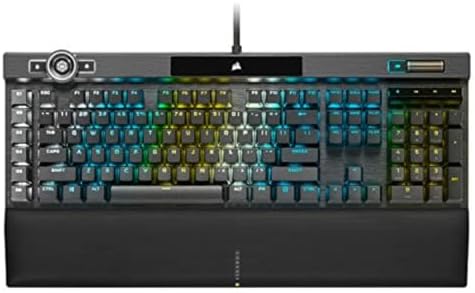
- You’ve Reached the Top: The CORSAIR K100 RGB is the pinnacle of CORSAIR keyboards, offering the cutting-edge performance…
- The Centerpiece of Your Setup: The CORSAIR K100 RGB boasts a refined design bolstered by a durable aluminum frame, dynam…
- Powered by CORSAIR AXON Hyper-Processing Technology: CORSAIR’s most advanced gaming keyboard experience delivers up to 4…
2. EPOMAKER X Aula F75 MAX — Best value mechanical keyboard
Who it is for: Players who want the most keyboard for the least money — a wireless 75% board with a screen, a knob, and hot-swappable switches, without giving up real mechanical feel. It is also a smart first mechanical board if you are coming from a membrane keyboard and do not want a bare-bones starter.
Switch notes: Hot-swappable mechanical switches in a gasket-mounted 75% board, with a creamy, deep sound out of the box. You can change switches later without soldering, so the feel is not locked in on day one — start with what it ships with, then swap if you want something lighter, heavier, or quieter.
Strengths: At $66.99, with a 4.6-star rating from 2,026 reviews, this is the best value-for-money mechanical board here. You get wireless connectivity, a 75% layout, a TFT screen and control knob, gasket mounting, RGB backlighting, and hot-swappable switches — a feature list that usually costs twice as much. For the money, it is the best mechanical keyboard here for first-time buyers.
Weaknesses: The TFT screen and knob are fun extras, not essentials, and at 75% there is no numpad — number-crunchers should look at a full-size board instead. EPOMAKER and AULA are not as established as Logitech or Corsair, so long-term software support is less of a sure thing.

- Compact Size, Function Core: With 80 programmable keys and a customizable screen, the F75 Max upgrades from its successf…
- Stylish and Ergonomic: Say goodbye to wrist strain and finger fatigue, as this Cherry-profile keyboard becomes your ergo…
- Satisfying Creamy Sound: Indulge in the creamy smooth melody of F75 MAX, composed by the rhythmic thud of every keystrok…
3. Logitech G PRO X TKL Rapid — Best premium Hall-effect keyboard
Who it is for: Competitive players who care about input speed more than anything else, and who play shooters or fast-paced games where a fraction of a keypress matters.
Switch notes: Hall-effect magnetic analog switches, not traditional mechanical contacts. A magnet and sensor track how far the key is pressed, which enables rapid trigger — the key can reset the moment you lift it slightly, instead of waiting for a fixed reset point. In practice, counter-strafing and rapid re-presses feel noticeably snappier. You can also tune actuation depth, so one board can feel different for gaming and typing.
Strengths: The tenkeyless layout gives your mouse more room, the build is tournament-clean, and the 4.7-star rating from 393 reviews backs up the premium feel. At $189.99, it is expensive, but it is the board here that most clearly changes how inputs feel. For competitive play, it is the best mechanical keyboard here for pure input speed.
Weaknesses: It is wired, it is TKL only (no numpad), and Hall-effect tuning takes a little setup time. If you just want to plug in and play without touching software, a simpler mechanical board will frustrate you less.

- Tournament-Grade Responsiveness and Precision: The PRO X TKL RAPID Wired Gaming Keyboard features magnetic analog (Hall-…
- React Instantly and Perform at Your Peak: The Rapid Trigger mode on this PC gaming keyboard allows key reactivation with…
- Optimize for Your Play Style: Achieve peak speed and accuracy with customizable actuation points and sensitivity; tailor…
4. Keychron K2 — Best compact mechanical keyboard
Who it is for: Typists, students, and desk-space savers who want a smaller board that still feels like a proper keyboard — and who want wireless without giving up mechanical switches.
Switch notes: Apex Brown switches, a brown tactile profile. You get that gentle bump on actuation without the loud click that drives housemates mad. For long typing sessions, brown is my default recommendation: it confirms each keypress without punishing your fingers or your ears.
Strengths: The 75% layout keeps function keys and arrows while freeing up real desk space, wireless and Bluetooth support make it easy to move between devices, and the 4.4-star rating from 1,634 reviews shows it has held up for a lot of owners. At $79.99, it is also easy to justify as a first compact board. It is the best mechanical keyboard in this guide for small desks and long typing sessions.
Weaknesses: No numpad, and the typing-first design means it will not win a spec-sheet fight against a Hall-effect esports board. If you live in spreadsheets or enter a lot of numbers, a full-size board is the better fit.

- Keychron K2, a 75% layout (84-key) white LED backlight compact Bluetooth mechanical keyboard. The ultimate keyboard that…
- Connects with up to 3 devices via Bluetooth and switch among them easily. With the latest Broadcom Bluetooth 5.1 chipset…
- With a unique Mac layout, K2 gaming keyboard has all necessary Mac function keys, while compatible with Windows. Extra k…
5. ASUS ROG Azoth Wireless — Best wireless and specialty mechanical keyboard
Who it is for: Enthusiasts who want a premium 75% board they can customize — swap switches, tweak the feel, and enjoy a board that looks as good as it types.
Switch notes: Pre-lubed ROG NX Snow Linear switches, hot-swappable. Out of the box they are smooth and quiet for a linear switch, with none of the scratchiness cheaper boards hide under RGB. Because the board is hot-swappable, you can try tactile or clicky switches later without soldering anything — this is the board to buy if you suspect you will catch the switch-swapping bug.
Strengths: Tri-mode wireless, PBT keycaps, an OLED display, and a gasket-style premium feel that makes typing genuinely pleasant. Rated 4.4 stars from 465 reviews, it is the most “keyboard hobby” pick here without going full custom-kit. For tinkerers, it is the best mechanical keyboard in this guide for customization.
Weaknesses: At $199.99 it is a luxury, and the OLED screen is nice rather than essential. If you never plan to swap a switch, you can get the same gaming performance cheaper elsewhere on this list.

- Tri-mode connectvity: Seamlessly connect to three devices via Bluetooth. Experience ultra-low latency gameplay with ROG …
- Gasket Mount & Premium Sound Tuning: A silicone gasket mount and three layers of integrated dampening foam work in harmo…
- Hot Swappable, Pre-Lubricated Mechanical Switches: Customize your keystrokes with ROG NX Snow linear switches (buttery s…
Best mechanical keyboards compared
Price alone does not tell you which board is right. The K100 is the flagship all-rounder, the G PRO X TKL Rapid is the fastest-feeling board, the Azoth is the most customizable, the K2 is the best compact typing companion, and the EPOMAKER X Aula F75 MAX is the value anchor. If you game and type in roughly equal measure, start from the middle: tactile switches and a layout you actually like will matter more day to day than a headline polling rate. That is how you narrow a long list down to the best mechanical keyboard for your desk, rather than the one with the loudest spec sheet.



Mechanical keyboard buying guide
Linear vs tactile vs clicky switches
Linear switches press straight down with no bump and no click. They are fast, smooth, and popular for shooters. Tactile switches add a small bump you can feel at actuation — great for typing accuracy and a good all-round choice. Clicky switches add a bump plus an audible click. They feel satisfying and are excellent for typing, but they are loud, and that noise wears thin in shared rooms and voice chat. If you are unsure, start tactile. It is the hardest switch type to regret.
Hall effect vs mechanical switches
Traditional mechanical switches use metal contacts that meet when you press a key. Hall-effect switches use a magnet and sensor instead, so there is no physical contact to wear out and the board can read exactly how far a key is pressed. That enables rapid trigger and adjustable actuation — the two features competitive players actually notice. The trade-off is price and setup: Hall-effect boards cost more, and you will spend time in software tuning them. For casual play and typing, a good mechanical switch is still more than fast enough.
Hot-swappable boards: worth it?
Hot-swappable means you can pull switches out and push new ones in without a soldering iron. If you like experimenting, it is a genuine money-saver — a set of switches costs far less than a new board. If you know exactly what you like and never plan to change, it is a nice bonus rather than a must-have. The Azoth is the pick here if swapping is part of the fun; you do not need it to get a great board.
Layout: full-size, TKL, or 75%?
Full-size gives you a numpad and is best for work that involves numbers. Tenkeyless (TKL) drops the numpad and gives your mouse elbow room — the classic competitive choice. A 75% board goes further, packing arrows and function keys into a tighter frame. It looks great and saves desk space, but the compressed layout takes a few days to learn. Do not buy smaller just because it looks tidy; buy the smallest layout you can use without hunting for keys.
Keycaps and sound
Keycaps change feel and sound more than most buyers expect. PBT double-shot keycaps, like those on the K100 and Azoth, resist shine and usually sound deeper and less rattly than thin ABS caps. Sound itself comes from the switch, the case, the keycaps, and the desk underneath — a foam or gasket-mounted board will sound softer than a hollow plastic one. If you type late at night, lean linear or tactile, avoid clicky, and put the board on a desk mat. Your microphone will thank you too. Sound is personal, which is why the best mechanical keyboard for one person can be too loud or too soft for the next — listen to sound tests before you buy.
For the rest of your setup, our Best Gaming Headsets 2026 guide covers audio, and Best Xbox Controllers 2026 covers controllers — both pair naturally with a mechanical board upgrade.
Mechanical keyboard FAQ
Are mechanical keyboards actually better for gaming?
For most players, yes — but not because of magic. Mechanical switches give you consistent actuation, better key rollover for multiple simultaneous presses, and a feel you can predict. That consistency helps in fast games and long sessions. A cheap mechanical board still beats a mushy membrane board, but a good membrane board is not unplayable; the jump is biggest when you pick the right switch for your games.
Are Hall-effect keyboards better than mechanical keyboards?
For competitive shooters, Hall effect has a real edge thanks to rapid trigger and adjustable actuation. For general gaming and typing, a traditional mechanical board is often simpler, cheaper, and easier to live with. Think of Hall effect as a specialist tool: brilliant if you will use its tuning, unnecessary if you will not.
What switch should a beginner choose?
Start with a tactile switch like a brown profile, or a light linear switch if you mainly play shooters. Tactile is the safest first choice because it gives feedback without noise. Avoid clicky switches as a first board unless you live alone and love the sound — your future self, and anyone on voice chat with you, will appreciate the restraint. For most beginners, the best mechanical keyboard is a tactile board you can type on all day without fatigue.
Do I need a hot-swappable mechanical keyboard?
No, but it is the cheapest way to learn what you like. With a hot-swappable board like the ROG Azoth, you can test linear, tactile, and clicky switches for the price of a switch set instead of a whole new keyboard. If you already know your preference, a soldered board is perfectly fine.
Verdict: which best mechanical keyboard should you buy?
If you want one board and you do not want to overthink it, buy the Corsair K100 RGB for flagship everything, or the EPOMAKER X Aula F75 MAX if your budget is tighter — both are proven, well-reviewed mechanical boards. If speed is the priority, the Logitech G PRO X TKL Rapid is the Hall-effect pick that actually feels different in-game. If desk space and typing matter most, the Keychron K2 is hard to beat at $79.99. And if you want to tinker, the ASUS ROG Azoth Wireless is the specialty board that will keep you happy long after the unboxing.
Whichever switch you choose, give it a week. Mechanical keyboards feel strange for the first day, normal by day three, and non-negotiable by day seven. We are also working on a dedicated 75% keyboards guide and a budget keyboards guide, so if you want an even deeper dive on compact layouts or cheaper picks, keep an eye on EWM PLAY — and check the Shop for the latest keyboard deals. Give the best mechanical keyboard you choose a full week before you judge it.