

game photo modes
Master Game Photo Modes: Capture PSshare-Worthy Views
PlayStation’s PSshare community regularly showcases player‑captured vistas that look like concept art. This guide breaks down the core photo‑mode toolset and shows how to turn those tools into showcase‑ready images.
Essential photo‑mode controls
Most modern titles expose a similar baseline: free‑camera movement, depth‑of‑field sliders, exposure compensation, and a handful of filter presets. Mastering the camera‑orbit speed and the focal‑length slider is the quickest way to move from “snapshot” to “composition”.
Turn off UI elements, hide the HUD, and lock the time of day when the game permits. A static light source makes exposure adjustments predictable across multiple shots.
Gear that lets you see the detail
An HDR‑capable IPS panel reproduces the wide colour gamut and contrast that photo modes push, so you can judge highlights and shadows before you upload.
Game‑by‑game breakdown
Three recent community highlights illustrate how each title’s photo mode leans into its art direction.
| Game | Notable photo‑mode feature | Community highlight |
|---|---|---|
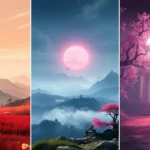
| Clair Obscur: Expedition 33 | Paint‑style filter that mimics brush strokes | call_me_xavii shared the creatively painted world |
| Elden Ring | Extensive depth‑of‑field and weather sliders | rorottino captured a sweeping view of the Lands Between |
| Ghost of Yōtei | Seasonal lighting presets, cherry‑blossom ambience | SheikhSadi80 posted a cherry blossom altar scene |
Each entry shows how a single tool—filter, DoF, or lighting preset—can become the visual signature of a share.
Precision input for fine framing
On PC, a high‑DPI mouse with programmable buttons lets you nudge the camera in sub‑pixel steps, essential for aligning horizon lines or positioning a character’s silhouette.
Sharing and community tips
Tag your screenshots with #PSshare and #PSBlog on the platform of choice. The PlayStation Blog’s “Share of the Week” roundup often pulls from those tags, so consistency matters.
Cross‑post to the EWMPLAY PSshare highlights and the follow‑up collection for extra visibility.
Keep a short caption that notes the game, the photo‑mode setting you used, and any post‑process tweaks. That context helps curators and fellow photographers replicate the look.
Quick answer
This guide teaches players how to use in‑game photo modes to capture stunning vistas worthy of PlayStation’s PSshare community showcase, with techniques demonstrated across Clair Obscur: Expedition 33, Elden Ring, and Ghost of Yōtei.
FAQ
- What basic settings should I adjust first in any photo mode?
- Start with camera freedom, depth‑of‑field, exposure, and hide the HUD.
- Does Ghost of Yōtei have a confirmed release date?
- The release date remains unconfirmed; photo‑mode details come from early community submissions.
- Can I use console photo modes on a PC monitor?
- Yes, capture on console and view on any HDR‑capable display for accurate colour judgement.
- Which input device gives the finest camera control on PC?
- A high‑DPI gaming mouse with programmable buttons enables micro‑adjustments.
- How do I increase the chance of being featured on PSshare?
- Use the official hashtags, provide a concise caption, and share during the weekly submission window highlighted on the PlayStation Blog.

Pingback: PSshare Highlights: This Week's Breathtaking Game Views 2026 - EWM PLAY