
Looking for the best microphone for streaming in 2026? This guide compares twelve mics — from the compact RØDE NT-USB Mini to the premium Shure MV7+ — so you can find the best microphone for streaming without an audio interface. If you’re building a complete setup, pair it with our best capture card.
Key facts
- Twelve mics now, not six — and they are no longer all the same kind: nine are condensers and three are dynamics, and two of them (the AM8T and the MV7+) also plug in over XLR if you buy an interface later. Every mic here still works over USB with no interface needed (manufacturer listings and reviews, 2026).
- The Logitech Blue Yeti is the only mic here with four pickup patterns: cardioid, bidirectional, omnidirectional, and stereo (Logitech/Blue listings; TechTippr, 2026).
- The FIFINE AmpliGame A6T is the only full kit here: mic, boom arm, shock mount, and pop filter in the box (FIFINE listings; Audio Drama Production, 2026).
- The original HyperX SoloCast is a different product from the SoloCast 2, which launched in August 2025 with a new boxy design and built-in shock mount and pop filter (Notebookcheck, August 2025; Tom’s Hardware, SoloCast 2 review).
- The HyperX QuadCast S is the RGB flagship here: four pickup patterns, tap-to-mute, and a built-in shock mount, 4.7 stars with more than 18,000 reviews (plugin, Nov 2026).
- The Razer Seiren V3 Chroma is the original 2024 model: Chroma RGB, tap-to-mute, and a shock mount in the box, 4.6 stars with more than 400 reviews (plugin, Nov 2026).
- The FIFINE AmpliGame AM8T is the budget dynamic kit: a dynamic mic with a boom arm in the box, 4.5 stars with more than 6,100 reviews (plugin, Nov 2026) — and it ignores keyboard noise far better than any condenser here.
- The HyperX QuadCast 2 S is the current-gen RGB flagship: four pickup patterns and a sharper recording spec than the QuadCast S, 4.6 stars with more than 800 reviews (plugin, Nov 2026). The recording spec is overkill for Twitch and YouTube — buy it for the mic, not the numbers.
- The Shure MV7+ is the premium pick: a dynamic mic with USB and XLR in one body, on-board Auto Level and denoising, 4.7 stars with more than 1,100 reviews (plugin, Nov 2026) — the most-recommended premium mic of 2026.
- The Shure MV6 (Gen 1) is the gaming dynamic, the SteelSeries Alias brings AI noise cancelling for noisy rooms, and the RØDE Wireless ME Single is the only wireless mic here — for streamers who move, not desk-bound streamers.
- The RØDE NT-USB Mini records at 24-bit/48 kHz over USB-C and has a built-in pop filter plus zero-latency headphone monitoring (RØDE via Equipboard/PC Gamer specs).
Your viewers will forgive an average webcam. They won’t forgive muddy, echoey voice audio — and that’s exactly why a dedicated USB mic is the single best first upgrade for a stream. You don’t need an interface, a mixer, or a treated room to sound noticeably better than a headset mic. You just need the right condenser mic for your desk, your room, and the way you actually stream.
Here’s the short version before we get into the detail. The RØDE NT-USB Mini is our overall winner for solo streamers: crisp voice, small footprint, and proper headphone monitoring in one tidy package. The Logitech Blue Yeti wins on versatility, because its four pickup patterns cover solo streams, two-person chats, and room recording that the others simply can’t do. The FIFINE AmpliGame A6T is the best starter kit, since the boom arm, shock mount, and pop filter are already in the box. And the original HyperX SoloCast is the pick for a tiny desk and a dead-simple setup — one mic, one tap-to-mute button, nothing to learn. The HyperX QuadCast S is the RGB flagship: four patterns, tap-to-mute, and a built-in shock mount in one mic for streaming, Discord, and podcasting. And the Razer Seiren V3 Chroma is the Chroma-setup pick — the original 2024 model, with RGB, tap-to-mute, and a shock mount in the box. Six more mics joined the guide in November 2026, and they change the shape of it. The FIFINE AM8T is the budget dynamic kit with the boom arm in the box, the Shure MV7+ is the premium dynamic hybrid that also works over XLR, and the Shure MV6 is the gaming dynamic for noisy rooms. The HyperX QuadCast 2 S is the current-gen RGB flagship, the SteelSeries Alias is the AI noise-cancelling pick, and the RØDE Wireless ME is the wireless mic for streamers who move.
Best microphone for streaming 2026: quick comparison
| Microphone | Best for | Pickup pattern | Connection | Headphone monitoring | Standout | Watch out for |
|---|---|---|---|---|---|---|
| RØDE NT-USB Mini — overall winner | Solo streamers who want crisp voice in a small footprint | Cardioid | USB-C | Yes, zero-latency, with volume dial | Built-in pop filter; 24-bit/48 kHz; RØDE Connect software | No on-mic gain control; can pick up room noise |
| Logitech Blue Yeti — best versatile | Multi-use creators: solo, duo, and room recording | Cardioid, bidirectional, omnidirectional, stereo | USB | Yes, zero-latency | Four patterns; onboard gain, mute, and headphone volume | Big and heavy on a desk; sensitive to room noise |
| FIFINE AmpliGame A6T — best starter kit | First-time streamers who want everything in one box | Cardioid | USB-C to USB-A | No — no headphone jack on the mic; monitor via your computer’s output | Boom arm, shock mount, and pop filter included; RGB lighting | USB-only, no XLR upgrade path; plastic body |
| HyperX SoloCast (original) — best tiny-desk simple mic | Small desks and no-fuss single-speaker streams | Cardioid | USB-C to USB-A | No | Tap-to-mute sensor with LED; compact and light | No gain dial, no headphone jack; needs to sit close to you |
| HyperX QuadCast S — best RGB flagship | One mic for streaming, Discord, and podcasting | Cardioid, bidirectional, omnidirectional, stereo | USB-C to USB-A | Yes, zero-latency (no on-mic headphone volume dial — via software) | Four patterns; tap-to-mute; built-in shock mount; RGB lighting | Needs gain tweaking out of the box; bigger than the SoloCast |
| Razer Seiren V3 Chroma (original 2024) — best Chroma-setup mic | Razer Chroma setups; RGB mic with shock mount included | Supercardioid | USB | Yes, zero-latency, dial toggles gain/headphone volume | Chroma RGB; tap-to-mute; shock mount included; Best Seller badge | No built-in noise cancellation; 32-Bit DSP twin shares the name |
| FIFINE AmpliGame AM8T — best budget dynamic kit | Streamers who want a dynamic mic and the boom arm in one box | Cardioid (dynamic) | USB-C + XLR | Yes, zero-latency, USB mode only | Boom arm in the box; dynamic capsule rejects room noise; RGB + tap-to-mute | No shock mount; heavy arm can tip a flimsy desk; no Xbox |
| HyperX QuadCast 2 S — best current-gen RGB flagship | Streamers who want the newest HyperX flagship | Cardioid, bidirectional, omnidirectional, stereo | USB-C | Yes, zero-latency, multifunction dial | 100+ aRGB LEDs with VU meter; detachable shock mount; top recording spec | Top spec is overkill for streaming; condenser likes a quiet room |
| SteelSeries Alias — best AI noise-cancelling mic | Noisy-room streamers who want software noise cancelling | Cardioid | USB-C | Yes, zero-latency, on-mic dials | 25mm capsule; Sonar AI noise cancelling; LED level meter | Needs Sonar on to earn its claim; smallest owner base here |
| Shure MV7+ — best premium dynamic hybrid | Serious streamers who want one mic for USB now and XLR later | Cardioid (dynamic) | USB-C + XLR | Yes, zero-latency | USB+XLR hybrid; Auto Level + denoiser on-board; LED touch panel | No XLR cable in the box; long-term durability unproven |
| Shure MV6 (Gen 1) — best dynamic gaming mic | Gamers in a noisy room who want Shure sound | Cardioid (dynamic) | USB-C | Yes, zero-latency | Voice Isolation + Auto Level + denoiser; MOTIV Mix app | No XLR path; mute button too sensitive; short cable in box |
| RØDE Wireless ME Single — best wireless mic | IRL streamers and presenters who move | Lavalier (clip-on) | USB-C receiver (wireless) | No — monitor via your phone or camera | Clip-on wireless; GainAssist auto-levelling; seven-hour battery | Can unpair; output runs quiet; no Lightning iPhone support |
Which streaming microphone should I buy first?
Buy the RØDE NT-USB Mini if you stream solo and want the best microphone for streaming with the cleanest out-of-the-box voice in the smallest package. It captures speech crisply, its cardioid pattern focuses on the voice in front of it, and the built-in pop filter tames harsh “p” and “b” sounds. Its headphone jack with zero-latency monitoring means you hear yourself as you sound live, not a delayed echo.
That recommendation comes with honest caveats, because no mic in this guide is magic. PC Gamer’s review praised the Mini’s crisp, clear test recordings but noted it picked up hum from a loud gaming PC, and Tom’s Guide found its audio gain-heavy with no gain control on the mic itself — the front dial controls headphone volume, not mic gain. So you’ll set gain in your OS or streaming software instead, and you’ll get the best results speaking fairly close to it. For a solo streamer who wants a tidy desk and a voice that cuts through game audio, though, that’s a trade worth making, and RØDE Connect software adds processing options on Mac and Windows.

- PLUG AND PLAY USB: connects straight to Mac, PC or iPad over USB, no interface or drivers needed
- STUDIO SOUND ON A DESK: condenser capsule with built-in pop filter tuned for voice, calls and streams
- HEAR YOURSELF LIVE: zero-latency headphone monitoring with hardware volume control on the mic
Is the Blue Yeti still good for streaming in 2026?
Yes — if you actually use what makes it different. The Yeti’s case in 2026 isn’t that it’s the newest or the smallest mic; it’s that no other mic in this guide switches between four pickup patterns. Cardioid handles your solo stream, bidirectional covers two people facing each other, omnidirectional captures a room, and stereo gives a wider recording. Recent 2026 roundups still list the Yeti as a versatile classic for exactly that reason, while noting newer, smaller mics now match it for a single voice.
Under the hood, it’s a three-capsule USB condenser with a 20 Hz–20 kHz frequency response, onboard gain, mute, and headphone-volume controls, plus a zero-latency headphone jack. Blue VO!CE processing through Logitech G HUB adds broadcast-style vocal effects if you want them. But — and this matters — the Yeti is big, heavy, and sensitive by design, so in an untreated room it will hear more of your keyboard, fan, and echo than a tighter mic would. Don’t confuse it with its siblings, either: the Yeti X adds a fourth capsule and a smart gain knob, and Logitech’s newer Yeti 2 is a separate model again. This guide covers the original Blue Yeti, full stop.

- Custom three-capsule array: This professional USB mic produces clear, powerful, broadcast-quality sound for YouTube vide…
- Blue VO!CE software: Elevate your streamings and recordings with clear broadcast vocal sound and entertain your audience…
- Four pickup patterns: Flexible cardioid, omni, bidirectional, and stereo pickup patterns allow you to record in ways tha…
What’s the best streaming mic kit for a beginner?
The FIFINE AmpliGame A6T, because it removes the most annoying part of starting out: buying accessories separately. You get the mic, a boom arm, a shock mount, a pop filter, a clamp, and a long USB cable in one box, which means you can clamp it to your desk, swing it into position, and go live the same day. Its cardioid condenser design focuses on your voice from the front, its tap-to-mute button sits right on top, and a volume knob at the bottom keeps level tweaks within reach.
Reviewers consistently score it as a strong-value starter kit, with the bundle and plug-and-play USB setup as its biggest strengths — and that lines up with FIFINE’s own spec sheet, which lists a 60 Hz–18 kHz response, USB-C on the mic end, and compatibility with PC, Mac, PS4, and PS5. Two honest limits: it’s USB-only, so there’s no XLR upgrade path if you later buy an interface, and like every condenser here it will still hear an untreated room. Also note the naming trap: the A6 ships with a desktop tripod, while the A6T — the version in this guide — is the boom-arm bundle. Check the listing title before you buy, because that one letter changes what’s in the box.

- [Right Out-of-the-Box] The plug-and-play gaming microphone set doesn’t need additional plug-ins or complicated device se…
- [Cool Lighting Design] Two-tone automatic gradient RGB makes your PC windows microphone icing on the cake. With soft and…
- [Easier Function Use] Setting touch-mute button on the top can be easily tapped with one hand, instead of holding the co…
Is the original HyperX SoloCast worth it, or should I get the SoloCast 2?
The original SoloCast is worth it if you want the simplest mic on this page and you can keep it close to your mouth — but don’t buy it thinking it’s the SoloCast 2, because it isn’t. The original is a small, round-bodied USB condenser with a single cardioid pattern, a tap-to-mute sensor with an LED on top, and a USB-C connection, and its standard spec is 16-bit/48 kHz. Tom’s Guide praised its rich, full voice recordings against other compact mics, while CGMagazine found it mid-heavy and a step behind some rivals on pure sound — which is a fair summary of where it sits: good, not class-leading, with simplicity as the real selling point.
What the original does not have matters as much as what it does. There’s no gain dial, no headphone jack, and no companion software to lean on, so monitoring means using your software, and level control lives in your OS. Long-term user reviews and Gadgets Middle East testing agree on the same practical rule: up close, roughly a hand’s width away, it sounds full and clear, but pulled back above a monitor or beyond a foot, your voice thins out and drops. The SoloCast 2, launched in August 2025, is a different, boxier mic with a built-in shock mount, an integrated pop filter, and 24-bit/96 kHz recording — genuinely useful upgrades, but a different product with a different listing. If your catalog card says “SoloCast” with no “2,” that’s the original, and this section describes that mic only.

- Plug N Play audio recording with USB-C connection: Get quality audio recordings with this easy-to-use USB condenser micr…
- Hi-Res 24-bit/96 kHz recording: SoloCast supports a high, studio-level bit depth and sampling rate.
- Tap-to-Mute sensor with LED status indicator: Simply tap the top of the mic to mute, and the easy-to-see LED indicator l…
Is the HyperX QuadCast S the best RGB streaming mic?
Short answer (57 words): Yes, if you want one mic for streaming, Discord, and podcasting with RGB to match your setup. The QuadCast S gives you four pickup patterns, a tap-to-mute sensor, and a built-in shock mount, so it covers solo streams, duo chats, and room recording. It is the step up from the SoloCast below, not a replacement for it.
The QuadCast S is the mic the SoloCast grows into. It is the same plug-and-play USB idea — no interface, no drivers — but with four pickup patterns where the SoloCast has one: cardioid for solo streams, bidirectional for two people facing each other, omnidirectional for a room, and stereo for a wider recording. HappyEnglishUK named it the best overall USB mic for Discord after testing twenty mics, and Notebookcheck calls it one of the highest-rated plug-and-play USB microphones. The RGB ring is the visible difference, but the patterns are the real upgrade.
The honest limits are small. It is a previous-generation mic — the newer QuadCast 2 S below is the current line — but the older mic is still actively sold and far better evidenced, with more than 18,000 owner reviews behind it. Out of the box it can need a little gain tweaking, and it is bigger and heavier than the SoloCast, so it wants a boom arm or a stable stand rather than a desktop tripod. Buy the Black version on the card: the White variant is unavailable or third-party priced.
Best for: Streamers who want one mic for streaming, Discord, and podcasting, with RGB that matches the setup — and anyone outgrowing the SoloCast.
Strengths: Four pickup patterns (cardioid, bidirectional, omnidirectional, stereo); tap-to-mute sensor with LED; built-in shock mount; RGB lighting; 4.7 stars with more than 18,000 owner reviews; best overall USB mic for Discord in HappyEnglishUK’s guide after testing twenty mics.
Weaknesses: Previous-generation mic; needs some gain tweaking out of the box; bigger and heavier than the SoloCast — wants a boom arm or stable stand; White variant unavailable or third-party priced.
Verdict: The best proven RGB flagship here. It is the SoloCast, grown up — one mic for streaming, Discord, and podcasting, with the patterns to cover all three.

Price on Amazon: $99.99 — check the live listing, prices change.
Should I buy the Razer Seiren V3 Chroma for a Chroma setup?
Short answer (57 words): Yes, if you run a Razer Chroma setup and want your mic to match it. The Seiren V3 Chroma is a USB condenser with Chroma RGB, a tap-to-mute sensor, and a shock mount in the box. It is the original 2024 model — not the newer 32-Bit DSP version — and it has no built-in noise cancellation.
The Seiren V3 Chroma is the mic for the Razer buyer — the one mic in this guide that belongs in a Chroma setup. It is a supercardioid USB condenser with Chroma RGB lighting, a tap-to-mute sensor, and a shock mount in the box, and it carries a Best Seller badge in its Amazon sub-category with more than a hundred bought in the past month. Pocket-lint scored it 4.5 out of 5, and Best Buy reviewers call it a game-changer, with 97 percent recommending it. For a streamer already running Razer gear, the mic finishes the desk.
The honest limits start with the name. Razer launched a second mic with the same name in July 2026 — the Seiren V3 Chroma 32-Bit DSP — and the two look identical. This guide covers the original 2024 model only, so check the card before you buy: if it says 32-Bit DSP, that is the other mic. The original also has no built-in noise cancellation, so in a noisy room its sensitivity can feed back — a quiet room, or a noise filter in your software, still matters. And at 4.6 stars with more than 400 reviews on the exact listing, its owner base is the second-smallest of the twelve mics here — only the Alias has fewer reviews — strong, but newer than the rest.
Best for: Streamers running a Razer Chroma setup who want the mic to match it, and anyone who wants RGB plus a shock mount in the box.
Strengths: Chroma RGB lighting; tap-to-mute sensor; shock mount included; Best Seller badge in its Amazon sub-category; 4.6 stars with more than 400 reviews on the exact listing; Pocket-lint 4.5 out of 5.
Weaknesses: No built-in noise cancellation — sensitivity can cause feedback in noisy rooms; the July 2026 32-Bit DSP model shares the same name and look — check the card; second-smallest owner base here (only the Alias has fewer reviews).
Verdict: The best Chroma-setup mic here. It finishes a Razer desk — just buy the original 2024 model, not the 32-Bit DSP twin.

- STREAM AND GAME REACTIVE LIGHTING — Amp it up with lighting that not only works with Chroma-integrated games, but respon…
- MULTI-FUNCTION TAP-TO-MUTE SENSOR — Simply tap the top of the mic to prevent audio mishaps during gaming, chatting, or s…
- SUPERCARDIOID CONDENSER MIC — Sound the best with an impressive mic sensitivity that can capture more voice detail, supp…
Is the FIFINE AM8T the best budget dynamic mic with a boom arm?
Short answer (60 words): Yes, if you want a dynamic mic that ignores your keyboard and comes with the boom arm already in the box. The AM8T pairs a dynamic capsule with USB and XLR connections, tap-to-mute, and RGB lighting, so it sounds close to a much pricier broadcast mic for far less. Just know the arm is heavy and there’s no shock mount.
The AM8T is the mic this guide was missing: a dynamic mic at the budget end. Where every condenser here hears your keyboard, your fan, and your bare walls, the AM8T’s dynamic capsule focuses on your voice and lets the rest fade — reviewers keep comparing its sound to the famous broadcast mics that cost several times more, and the honest version of that comparison is “close for the price”, never “equal”. It comes as a complete kit — mic, boom arm, clamp, and cable — so you clamp it to the desk and go live the same day, and it works over USB now and over XLR later if you ever buy an interface. It is the number-one bestseller in its vocal dynamic sub-category, with more than 6,100 owner reviews behind it, and the recent reviews from September and October 2026 are all positive.
The honest limits are in the box, not the sound. There is no shock mount, so desk taps travel straight through the arm into the mic. The arm itself is heavy and can tip a flimsy desk, and one reviewer found the included USB cable caused crackling until they swapped it for a different cable. The on-mic RGB, mute, and headphone monitoring only work over USB — plug it in over XLR and those features switch off. And it does not work with Xbox, full stop. Buy the Black kit with the boom arm on the card: the mic-only version is a different product with a wobbly desktop stand.
- Best for: Streamers upgrading from a headset mic who want a dynamic mic and the boom-arm desk setup in one box — and anyone whose keyboard is louder than their voice.
- Strengths: Dynamic capsule that rejects keyboard and room noise; boom arm, clamp, and cable in the box; USB now, XLR later; tap-to-mute and RGB lighting; 3.5mm zero-latency headphone monitoring in USB mode; 4.5 stars with more than 6,100 owner reviews; number-one bestseller in its vocal dynamic sub-category.
- Weaknesses: No shock mount — desk taps transmit through the arm; heavy arm can tip a flimsy desk; RGB, mute, and monitoring work in USB mode only, not XLR; one reviewer reported crackling with the included USB cable; not compatible with Xbox.
- Verdict: The best budget dynamic kit here. It is the cheapest honest way to stop your stream sounding like your keyboard — buy it when the room is the problem and the budget is tight.

- USB/XLR Connectivity-AM8T comes with a dynamic microphone and a boom arm stand. Versatile PC gaming microphone kit with …
- Vibrant RGB Light-The streaming microphone RGB illuminates your gaming setup with customizable RGB lighting for a visual…
- Enhanced Features-Featured -50dB sensitivity and cardioid polar pattern, the USB recording mic kit not easily pick up ba…
Should I buy the HyperX QuadCast 2 S or stick with the QuadCast S?
Short answer (56 words): Buy it if you want the newest HyperX flagship with RGB to match. The QuadCast 2 S keeps the four pickup patterns and tap-to-mute of the QuadCast S, adds a sharper recording spec and a brighter LED display, and stays plug-and-play over USB-C. The older QuadCast S still has far more owner reviews behind it, though.
The QuadCast 2 S is the current line — the mic the QuadCast S grows into. It keeps everything that made the S the RGB flagship here: four pickup patterns (cardioid, bidirectional, omnidirectional, stereo), tap-to-mute, a built-in shock mount, and RGB lighting, now with more than a hundred individual LEDs and a volume-unit meter on the front. The recording spec steps up to the highest resolution of any consumer USB gaming mic, and it stays plug-and-play over USB-C with a 3.5mm headphone jack for zero-latency monitoring. Tom’s Hardware recommends it for streaming, and Hardware Asylum’s November 2026 roundup leads with it as the pick for high-end streamers. Its rating has sat steady at 4.6 stars while the review count grew by roughly forty percent since July — a healthy direction, not a spike.
The honest limit is the spec itself: that recording resolution is overkill for Twitch and YouTube, and no listener will hear the difference in a stream. It is still a condenser, so it likes a quieter room — if your room is noisy, the dynamics below are the honest answer. And with fewer than a thousand owner reviews, it is far less proven than the QuadCast S it succeeds, which carries more than eighteen thousand. Buy the Black S model on the card: the non-S QuadCast 2 is the same mic minus the RGB and the top recording spec, and it is not the pick here.
- Best for: Streamers who want the newest HyperX flagship with RGB to match the setup — and anyone buying a QuadCast for the first time today.
- Strengths: Four pickup patterns (cardioid, bidirectional, omnidirectional, stereo); tap-to-mute sensor; built-in shock mount; 100+ aRGB LEDs with VU meter; 3.5mm zero-latency headphone monitoring with a multifunction dial; USB-C plug-and-play; 4.6 stars with a steadily growing review count.
- Weaknesses: The top recording spec is overkill for streaming — no audible advantage on Twitch or YouTube; still a condenser, so it hears a noisy room; far fewer owner reviews than the QuadCast S it succeeds; the non-S twin shares the name and look — check the card.
- Verdict: The best current-gen RGB flagship here. Buy it when you want the newest HyperX mic; buy the QuadCast S above when you want the same idea with eighteen thousand reviews behind it.

- Future Ready Audio: The QuadCast 2 S features best-in-class audio recording resolution on a consumer USB gaming micropho…
- Dynamic Lighting Display: QuadCast 2 S has over 100+ individually customizable aRGB LEDs allowing users to display over …
- Tap-to-Mute Sensor: The Tap-to-Mute sensor allows users to quickly mute/unmute the mic to manage what is heard.
Is the SteelSeries Alias the best USB mic for a noisy room?
Short answer (59 words): Yes, if your room is noisy and you don’t want to pay Shure money to fix it. The Alias pairs a big 25mm condenser capsule with Sonar software and AI noise cancelling, plus on-mic gain and headphone volume dials. Just know the software does the heavy lifting — with Sonar off, it’s still a condenser that hears the room.
The Alias is SteelSeries’ first dedicated microphone, and it is the only mic here that fights noise with software instead of with a dynamic capsule. Its 25mm condenser capsule is three times the size of a standard mic capsule, and Sonar for Streamers — SteelSeries’ free software — adds AI noise cancelling, a mixer for up to eight sources, and broadcast-style processing. The hardware is genuinely thoughtful too: a five-stage LED level meter that turns into a big red X when you mute, a touch mute button, on-mic gain and headphone volume dials, and a 3.5mm headphone jack for zero-latency monitoring. TechRadar called it a very impressive debut, and it is the first SteelSeries product in this guide.
The honest limits start with the software. Owners split on Sonar: some praise the AI noise cancelling for hearing them clearly over loud music, others call the software bloated and the noise cancelling underwhelming after heavy tweaking. And the capsule is still a condenser — with Sonar off, it will pick up more of the room than the MV6 or MV7+ below, so this mic needs its software switched on to earn its place. The LED level meter sits on one side only, which owners notice. And at 344 reviews, its owner base is the smallest in this guide — the plugin must re-confirm the count is still above three hundred at publish.
- Best for: Noisy-room streamers and Discord users who want software noise cancelling without paying Shure prices — and SteelSeries-ecosystem buyers.
- Strengths: 25mm condenser capsule; Sonar software with AI noise cancelling and a built-in mixer; five-stage LED level meter with mute display; on-mic gain and headphone volume dials; 3.5mm zero-latency headphone monitoring; 4.6 stars.
- Weaknesses: Needs Sonar switched on to earn its noise-cancelling claim — with it off, it is still a condenser that hears the room; Sonar splits owners (powerful but fiddly, some call it bloated); LED meter on one side only; smallest owner base in this guide — count must be re-confirmed at publish.
- Verdict: The best AI noise-cancelling mic here. Buy it when your room is noisy and you like tuning software; buy a dynamic below when you want the room gone without touching a setting.

- DESIGNED FOR GAMERS – Mic for gaming, broadcasting, and podcasting, level up your stream with Alias and free audio softw…
- 3X BIGGER CAPSULE – Capture a wide range of vocals with a capsule up to three times bigger than other mics
- ALL-IN-ONE SOFTWARE – Sonar is the ultimate audio solution, with mixing, easy drag ‘n’ drop app routing, AI noise cancel…
Is the Shure MV7+ the last streaming mic you’ll ever need?
Short answer (59 words): Yes, if you want the best-sounding mic in this guide and you’re done buying mics. The MV7+ is a dynamic mic with USB and XLR in one body, on-board Auto Level and denoising, and a tap-to-mute LED panel. It costs more than everything else here, but it’s the one mic you’d keep if you upgraded to an interface later.
The MV7+ is the most-recommended premium mic of 2026, and it earns that the boring way: by being good at everything. It is a dynamic mic, so it hears your voice and far less of your keyboard, your fan, and your room — the thing every condenser in this guide struggles with. It runs USB-C and XLR from the same body, so you plug it straight into your computer today and into an interface later without buying a second mic. Auto Level Mode, a real-time denoiser, and a digital pop filter all run on-board, the LED touch panel shows your level and tap-mutes, and a 3.5mm headphone jack gives zero-latency monitoring. PC Gamer, GamesRadar, and knowledgelib all name it their best overall pick for 2026, it is OBS Certified, and owners in September 2026 call it excellent with no complaints. At 4.7 stars with more than 1,100 reviews, it is the highest-rated mic in this guide.
The honest limits are small but real. No XLR cable comes in the box — just the USB-C cable and a foam windscreen — so the XLR future costs you a cable. It is a 2024 model, so long-term durability is unproven, and this guide will not claim a decade of reliability for it. One owner noted speaker bleed in a speaker-based setup, fixed with NVIDIA Broadcast. And it is the premium-priced mic here, which only makes sense if you stream often enough to hear the difference. Buy the mic-only Black version on the card: the stand bundle is a different listing.
- Best for: Serious streamers and podcasters who want broadcast sound in an untreated room with zero extra gear — and anyone who wants one mic that survives an upgrade to XLR.
- Strengths: Dynamic capsule that rejects room and keyboard noise; USB-C and XLR in one body; on-board Auto Level, real-time denoiser, and digital pop filter; LED touch panel with level display and tap-to-mute; 3.5mm zero-latency headphone monitoring; OBS Certified; 4.7 stars with more than 1,100 owner reviews; the most-recommended premium mic of 2026.
- Weaknesses: No XLR cable in the box; long-term durability unproven (2024 model — do not claim a decade of reliability); speaker bleed in speaker-based setups (fixed with NVIDIA Broadcast); the premium-priced mic here.
- Verdict: The best premium mic here, and the one to buy if you are done buying mics. It is the end of the upgrade path, not another step on it.

- CUSTOMIZABLE LED TOUCH PANEL: Personalize your setup with a full-color LED touch panel featuring 16.8 million color opti…
- AUTO LEVEL & REAL-TIME DENOISING: Auto Level Mode intelligently adjusts gain based on distance and volume, while the rea…
- BUILT-IN REVERB EFFECTS: Add depth and character to your sound with integrated reverb modes, including Plate, Hall, and …
Should I buy the Shure MV6 instead of the MV7+?
Short answer (57 words): Yes, if you game in a noisy room and want Shure’s dynamic sound without the MV7+ price. The MV6 is a USB dynamic mic with Voice Isolation, Auto Level, and a real-time denoiser built in, plus a headphone jack for zero-latency monitoring. It’s USB-only with no XLR path, and the mute button is easy to hit by accident.
The MV6 is the MV7+’s little brother, and it is the best USB mic for gaming in PC Gamer’s words. Same idea, smaller package: a dynamic capsule with Voice Isolation Technology that focuses on your voice and rejects the room, Auto Level Mode that keeps your volume steady, a real-time denoiser, and a digital pop filter — all running on-board, configured in Shure’s free MOTIV Mix app. It plugs in over USB-C to a PC, Mac, phone, or tablet, it has a 3.5mm headphone jack for zero-latency monitoring, and a tap-to-mute button on top. Owners call it the first mic that made them stop fiddling, and one reviewer called it most of the flagship Shure sound for a fraction of the price.
The honest limits start with the rating, which has drifted down as the review count grew — from 4.6 to 4.4 across the research mirrors, with the live plugin figure now at 4.5. That is a soft negative signal, and this guide states it rather than hiding it. One detailed older review reports tin-can sound from Auto Level overcorrecting, so the auto-levelling can bite if it is pushed too hard. The mute button is too sensitive and owners mute themselves by accident. The included USB cable is comically short, and there is no XLR path — unlike the MV7+ above, this mic never grows into an interface setup. And it wants a boom arm for best results, which is not in the box.
- Best for: Gamers in a noisy room who want Shure’s dynamic sound at half the MV7+ slot — and anyone who wants the MV7+ idea without the MV7+ commitment.
- Strengths: Dynamic capsule with Voice Isolation; on-board Auto Level, real-time denoiser, and digital pop filter; 3.5mm zero-latency headphone monitoring; tap-to-mute; MOTIV Mix app; USB-C to PC, Mac, phone, or tablet; 4.5 stars with more than 1,300 owner reviews.
- Weaknesses: Rating has drifted down as the count grew (4.6 to 4.4 in research mirrors) — a soft negative signal; Auto Level can overcorrect and thin the sound; mute button too sensitive (accidental mutes); included USB cable is short; USB-only, no XLR upgrade path; boom arm not included.
- Verdict: The best dynamic gaming mic here. Buy it when you want Shure sound in a noisy room and the MV7+ is more than you need — but only if the plugin confirms healthy stock from Amazon or Shure at publish.
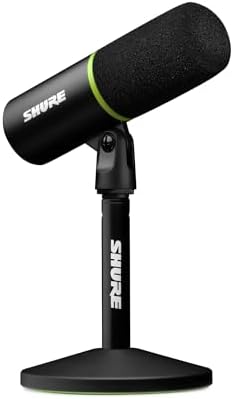
- MAKE YOUR VOICE THE CENTERPIECE: Whether you’re gaming, livestreaming, podcasting, or chatting with teammates, the MV6 d…
- FOCUSED VOICE ISOLATION TECHNOLOGY: Dynamic cardioid microphone with Voice Isolation Technology helps reduce keyboard cl…
- SMART DSP AUDIO PROCESSING: Features Auto Level Mode, Real-Time Denoiser, and Digital Popper Stopper technology to maint…
Do I need a wireless mic for streaming, or is a desk mic enough?
Short answer (60 words): Yes, if your stream moves — IRL walks, phone videos, or presenting away from your desk. The Wireless ME clips on, sends clean audio to a USB-C receiver, and runs for hours on a charge. It’s not a desk mic, though: it won’t replace a proper USB mic for a seated stream, and it can unpair at the worst moment.
The Wireless ME is the only mic in this guide that is not on your desk. It is a clip-on wireless lavalier: the tiny transmitter clips to your shirt, the USB-C receiver plugs into your phone or camera, and you walk, present, or stream IRL with clean audio and no cable. GainAssist auto-levelling keeps your volume steady without touching a setting, the battery runs for seven hours, and the range reaches a hundred metres. Reviewers call it the best-value wireless mic for creators, and with more than 1,600 owner reviews it has a large installed base for a wireless system. It serves a genuinely different buyer from every desk mic here — the moving creator, not the seated gamer.
The honest limits are the wireless ones. Owners report the mics like to unpair, and re-pairing can be a pain — the worst failure a live stream can have. The output runs a bit quiet regardless of settings, and the glossy finish scratches quickly. There is no Lightning support for iPhones, and no direct mirrorless-camera connection without an adapter. And at 4.3 stars it sits on the rating floor — it passes only on the strength of the RØDE brand and the size of its owner base, so the plugin must re-confirm the rating at publish. Buy the Single on the card: the Dual and the bundle listings are different products.
- Best for: IRL streamers, phone creators, and presenters who move — anyone whose stream leaves the desk.
- Strengths: Clip-on wireless freedom; USB-C receiver; GainAssist auto-levelling; seven-hour battery; hundred-metre range; 4.3 stars with more than 1,600 owner reviews; the cheapest entry in RØDE’s Wireless series.
- Weaknesses: Can unpair, and re-pairing can be a pain; output runs a bit quiet; glossy finish scratches quickly; no Lightning iPhone support; no direct mirrorless-camera connection without an adapter; floor-edge rating — re-confirm at publish.
- Verdict: The best wireless mic here — and the only one. Buy it when your stream moves; skip it when your stream sits at a desk, because a desk mic still sounds better there.

- Ultra-compact and easy-to-use wireless microphone system for filmmaking, interviewing, TikTok, streaming, podcasting and…
- Features a microphone in the transmitter from recording your subject from over 100m away, and a microphone in the receiv…
- Intelligent GainAssist technology automatically adjusts your gain level to ensure your recordings remain crystal-clear w…
Best microphone for streaming 2026 — comparison
Will a condenser mic pick up my keyboard and room noise?
Yes, more than a dynamic mic will — and that’s the one honest warning that applies to the nine condensers in this guide. The three dynamics below — the AM8T, the MV6, and the MV7+ — are the answer when your room is the problem, because a dynamic capsule hears your voice and far less of everything else. Condensers are sensitive by design: they capture vocal detail beautifully, but they’ll also hear keyboard clicks, fan hum, and bare-wall echo in an untreated room. Turtle Beach’s condenser-versus-dynamic testing puts it bluntly — dynamic mics barely registered nearby keystrokes where a condenser picked up every click — and that’s consistent with what reviewers found for the Yeti, the Mini, the SoloCast — and the two new RGB mics here — alike.
That doesn’t mean you need a different mic type to start streaming. It means placement does more work than shopping does. Keep the mic close to your mouth, point its less-sensitive rear away from your keyboard where you can, and use a boom arm — the A6T includes one — to get the mic off the desk and away from vibration. A cardioid pattern helps, because it favors sound from the front, but it isn’t noise cancellation, and no software filter fully replaces getting the mic close. If your room is genuinely loud and you can’t change it, one of the three dynamics below is the better next step — the AM8T if you want the boom arm in the box, the MV6 for gaming, or the MV7+ if you want the best of the three — but for a normal bedroom or office, a close-placed condenser from this guide will sound dramatically better than a headset mic.
Do I need an audio interface or extra software for any of these mics?
No — for the USB mics here, at least. Every mic in this guide works over USB without an interface, which is the whole point of a USB streaming mic — and two of the new ones, the AM8T and the MV7+, also offer XLR if you buy an interface later. The Wireless ME is the exception to the rule: it connects over a wireless USB-C receiver, not a cable. The Yeti works driver-free on Mac and PC, with Blue VO!CE processing as an optional extra through Logitech G HUB; the Mini is class-compliant over USB-C with RØDE Connect as its optional software; the A6T is plug-and-play with no drivers; and the SoloCast has no drivers or software at all. If you’re on PS4 or PS5, the A6T and the SoloCast both list console compatibility over USB, while the Yeti and Mini are desktop-first picks — check the console listing before buying for a console-only setup. The QuadCast S, the Seiren V3 Chroma, the QuadCast 2 S, and the Alias are desktop-first picks; check the console listing before buying for a console-only setup. The AM8T lists PS4 and PS5 over USB — but not Xbox — and the MV6 and MV7+ connect over USB-C to PC, Mac, and phones and tablets.
How do I set up a USB mic so I don’t sound distant or echoey?
Start close, then fix the room around the mic — not the other way round. Aim for roughly a hand’s width to a foot from your mouth, speak into the front of the mic (not the top), and keep the mic on a boom arm or stable stand rather than flat on the desk where it picks up every thump. Set your gain so your normal speaking voice peaks comfortably without clipping, then do a short test recording in OBS or your streaming app and actually listen back before going live. If you hear echo, move closer and add anything soft behind you — curtains, a bookshelf, even a blanket over a bare wall — before you spend money on a new mic, because a close mic in a softened room beats an expensive mic across the room every time.
The verdict: one winner, eleven honest alternatives
Overall winner for the best microphone for streaming: RØDE NT-USB Mini. For a solo streamer, it’s the tightest package here — crisp voice, built-in pop filter, zero-latency monitoring, and a footprint that won’t eat your desk — with the caveat that gain lives in software, not on the mic. Best versatile: Logitech Blue Yeti. Buy it when one mic has to cover solo streams, two-person recordings, and room capture, and accept the bigger desk footprint and room sensitivity that come with it. Best starter kit: FIFINE AmpliGame A6T. Buy it when you want the boom arm, shock mount, and pop filter sorted in one box and you don’t care about an XLR upgrade path yet. Best tiny-desk simple mic: HyperX SoloCast (original). Buy it when you want one button, one pattern, and nothing to configure — and keep it close, because distance is its weakness. Best proven RGB flagship: HyperX QuadCast S. Buy it when you want one mic for streaming, Discord, and podcasting, with four patterns and RGB to match the setup — and accept that it is the previous generation and wants a boom arm. Best Chroma-setup mic: Razer Seiren V3 Chroma (original 2024 model). Buy it when your desk already runs Chroma and you want the mic to match — and check the card, because the 32-Bit DSP twin shares the name. Best budget dynamic kit: FIFINE AmpliGame AM8T. Buy it when your keyboard is louder than your voice and you want the boom arm in the box — and accept there is no shock mount. Best current-gen RGB flagship: HyperX QuadCast 2 S. Buy it when you want the newest HyperX mic — and accept the older S has far more reviews behind it. Best AI noise-cancelling mic: SteelSeries Alias. Buy it when your room is noisy and you like tuning software — and keep Sonar switched on. Best premium dynamic hybrid: Shure MV7+. Buy it when you are done buying mics and want USB now with XLR later. Best dynamic gaming mic: Shure MV6 (Gen 1). Buy it when you game in a noisy room and want Shure sound — and only if the plugin confirms healthy stock at publish. Best wireless mic: RØDE Wireless ME Single. Buy it when your stream moves — and skip it when your stream sits at a desk.
Browse the full microphone category to compare these against the rest of the catalog: /shop/microphones/.
For more on microphone types, see Turtle Beach’s condenser vs dynamic guide.
Related guides
As an Amazon Associate, EWM PLAY earns from qualifying purchases made through links on this page, at no additional cost to you.